At the heart of any great learning experience is a reliable player. When content launches smoothly and tracks reliably, learners stay engaged and administrative headaches disappear. We received a lot of great feedback from our wonderful customers over the year for updates and new additions to provide a player experience that their customers and learners require. That’s one of the reasons we spent much of the past year improving Rustici Engine‘s player. We also added some new options for platforms that use Learning Tools Interoperability (LTI).
Here’s a look at what’s landed in Engine 24 over the last year.
An enhanced media player
Engine plays plenty of content beyond SCORM, including PDFs, audio and video. The more consistent the experience is across all of them, the more reliable your platform feels. It also means learners can work through content without stopping to figure out each player.
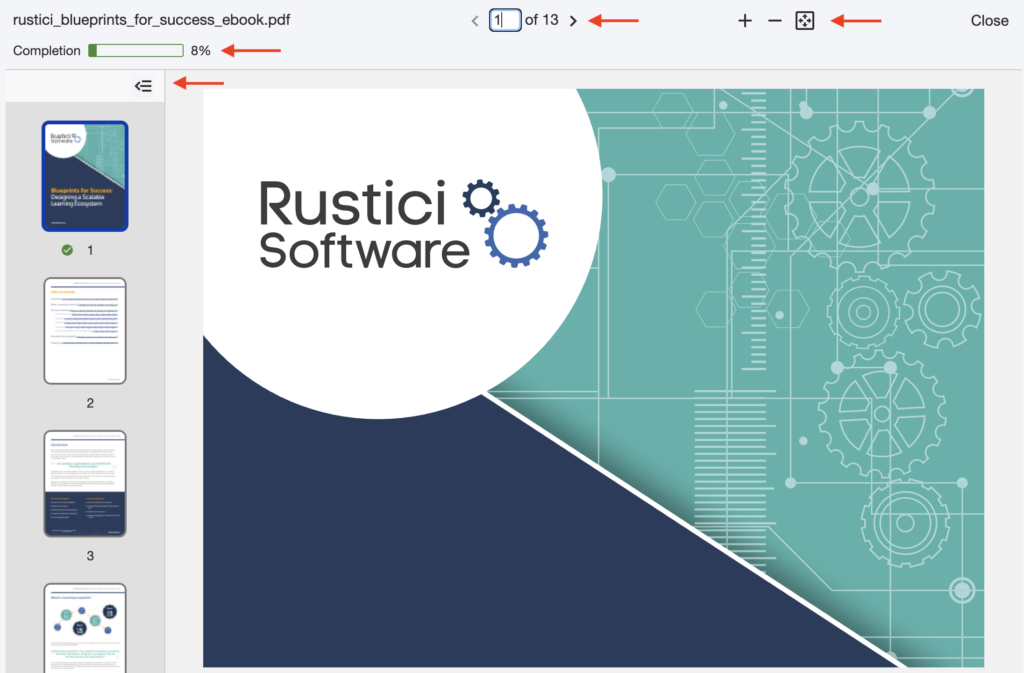
- Progress indicators for media and PDFs: A new progress indicator in the media player shows learners how far they’ve gotten in an audio or video file and how much is left. A separate setting, PDFContentDisplayProgress, adds a progress display for PDF content.
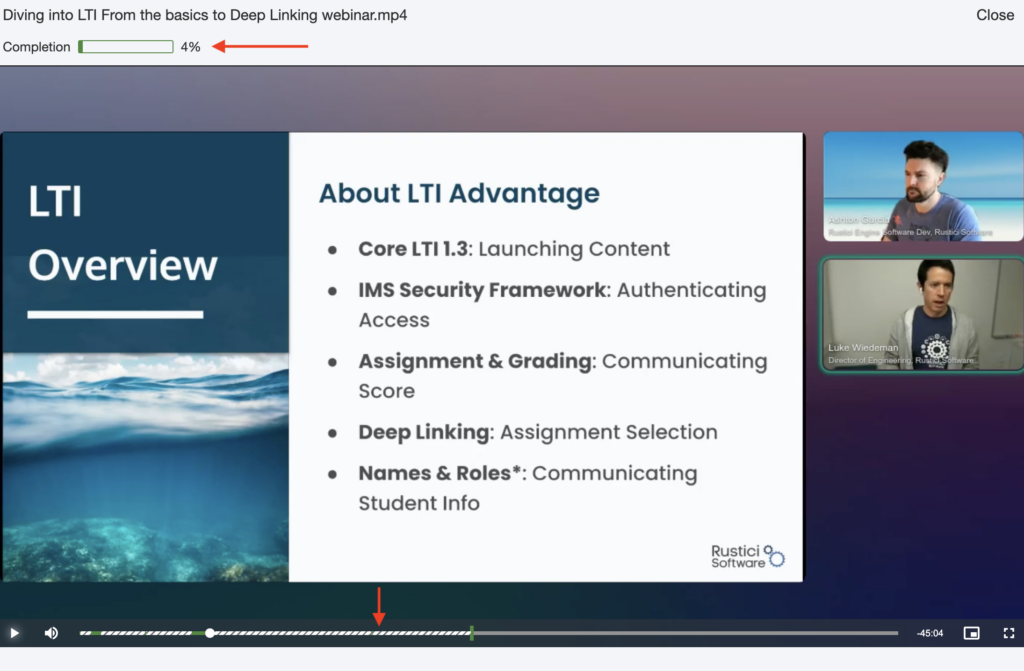
- An enhanced audio and video player: The new AudioVideoPlayerUseEnhancedUI setting turns on a refreshed interface for the audio and video player. The new player shows things like watched and skipped segments, shows the farthest viewpoint and more.
- An option to prevent skipping ahead: With the AudioVideoPlayerPreventSkipUnwatched setting, you can keep learners from jumping past parts of an audio or video file they haven’t watched yet.
- Preview launches for media content: Previously only available for SCORM and AICC, media content can now be launched as a preview, so someone can get a quick peek of a course without starting a tracked attempt.
- More flexible duration tracking: The MediaContentDurationMode setting gives you options for how duration is tracked during media content, like how long it is open, to include pauses or even how long it was played excluding pauses. Media courses also now record their media type through a new mediaType property on the course schema.
It should be mentioned that these new settings and enhancements will not be turned on by default. You can learn how to enable them with our documentation or by reaching out to the team for support.
 |
 |
More ways to work with LTI 1.3
We’ve seen growing interest in LTI lately, and it’s easy to see why. LTI lets platforms launch external tools, pull in content from libraries and pass results back, and there are a lot of ways to put it to work. The timing matters too. As more learning platforms move to LTI 1.3 and discontinue support for LTI 1.1, we’ve been expanding what Engine can do as an LTI platform, the side that launches LTI tools for your learners.
- Deep Linking data property support: Engine now supports the data property in LTI 1.3 Deep Linking. This lets you tie together imported courses to a particular Deep Linking session by sending custom data when generating the selector URL, and the tool echoes that data back in its Deep Linking response. Engine then surfaces it in the import results.
- Additional ID token claims: A new registration-level launch setting, Lti13AdditionalIdTokenClaims, lets you add extra LTI claims to the authentication ID token Engine sends when launching a tool. It’s handy when a tool expects information beyond the standard claims.
- A choice of subject identifier: The new Lti13SubjectIdentifierFormat setting lets you use a registration’s learner identifier as the subject identifier (the “sub” claim) in the LTI 1.3 authentication tokens Engine sends. Choose LearnerId to use the learner identifier, or Legacy to keep the existing behavior.
We’re also working on LTI Dynamic Registration support for Engine. Dynamic Registration automates the setup between a platform and a tool, so configuration details are exchanged automatically instead of copied over by hand. (In LTI, “registration” means connecting a tool to a platform, not a learner’s registration in Engine.) To hear when it’s available, follow our release notes by clicking the “Follow” button in our knowledge base.
Want to learn more?
We’re excited to see Rustici Engine content player and the way it handles content and eLearning standards like LTI evolve. If you’re looking for an integrated content player, or want to see how Engine’s support for standards like SCORM and LTI could fit your platform, reach out to our team. We’re always happy to dig into the details. If you’re already using Engine, the full Engine 24 release notes cover every update.