The learning technology landscape is currently undergoing some consolidation. For many organizations, the decision to switch LMSs isn’t initially optional; it is a direct result of their LMS being sold, reimagined or decommissioned. As the foundation of the learning tech stack shifts, L&D leaders may start considering an LMS migration to a tool that better meets their needs.
Although the complexities of moving an LMS often include the massive manual effort of migrating content libraries, the risk of data loss, and the constant worry that your existing courses will not be fully compatible with the new platform’s standards. Before making the jump into a new LMS, your L&D teams need to protect your most valuable asset: training content.
More consolidation: When specialists get absorbed
The LMS market has always been competitive, but more recently we’ve seen a specific trend: parent companies acquiring specialized or legacy platforms to fold them into a larger, refocused vision.
Here are just a few of the shifts prompting teams to ask how to migrate their training data and bridge the gap between systems:
- The Cornerstone Galaxy absorption: With the acquisitions of Saba Cloud, SumTotal, EdCast and SkyHive, users are now looking for ways to bridge the gap between their legacy workflows and the new integrated platform.
- Learning Pool and WorkRamp: As Learning Pool acquires WorkRamp, mid-market customers are exploring how to maintain their agile content workflows within a larger global technology stack.
- The Momentive portfolio shift: Momentive Software’s acquisition of Path LMS and BlueSky eLearn—and the sunsetting of Crowd Wisdom and Freestone LMS—has many association leaders wondering how to export training from their current systems without losing years of historical data.
- The category leader consolidation: Non-LMS platforms like Gainsight, ClearCompany and Workday are also making moves towards expanding their learning offerings by buying up specialized tools (Skilljar, Brainier, Sana Labs).
The challenge: Balancing all-in-one efficiency with adaptability
The LMS industry is increasingly evolving toward “all-in-one” platforms that combine authoring, delivery and the learner experience. While this can offer benefits for reducing your overall tech stack, you may find yourself stuck in the middle of a tool that doesn’t fully meet your needs. This is often the fork in the road for many leaders: do you adapt your workflows to a new platform’s limitations, or face the lengthy, expensive process of swapping LMSs yet again?
This isn’t the first time the industry has seen a major shift, and it won’t be the last. Years ago, the trend favored a “best-of-breed” approach where everyone had a different tool for every job. Today, coinciding with the all-in-one shift, we are seeing a massive outpouring of AI-specific tools. Whatever the current market trend gives you in terms of your tech stack, you need the infrastructure to be ready to adapt to whatever your LMS throws at you while still delivering great experiences to your learners.
Enter the content hub: Your LMS migration insurance policy
With all that said, treating your LMS as your single source of truth is no longer viable in a world where learning platforms are constantly shifting and evolving. Instead of letting your LMS act as your central content repository, we recommend a “Content Hub” approach.
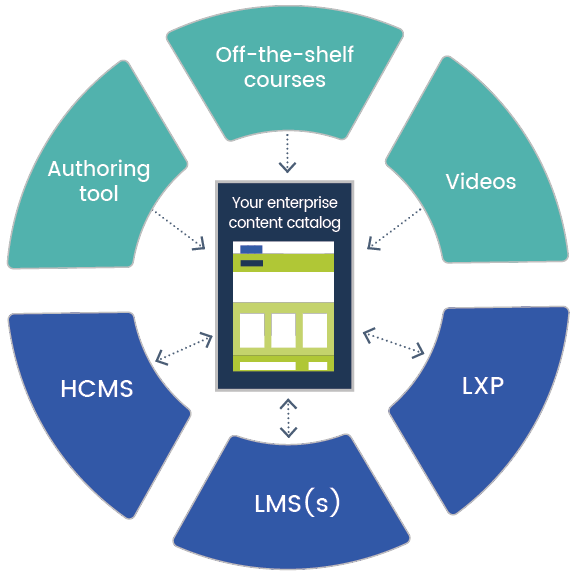
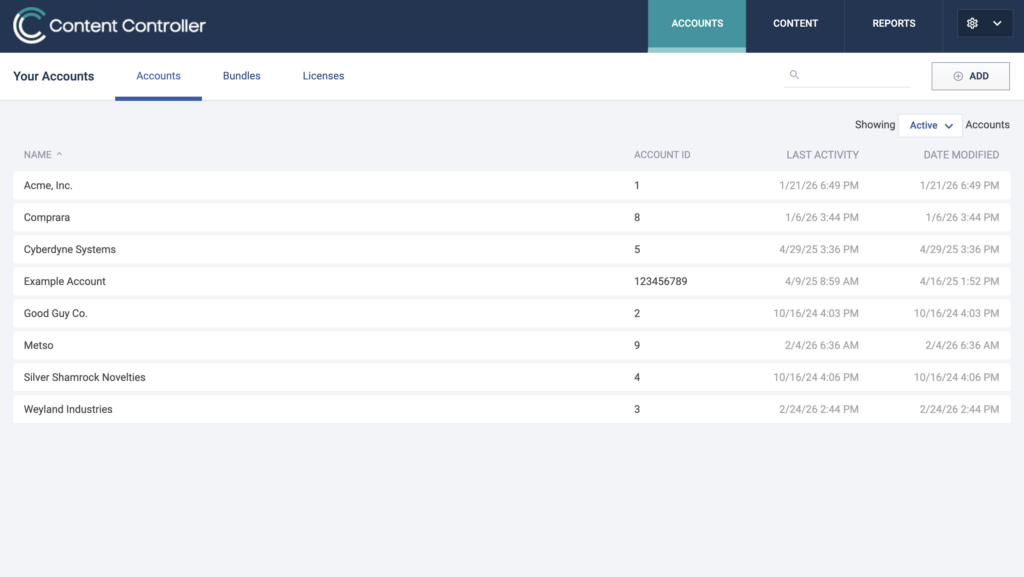
A content hub is an external repository for all your eLearning courses and content that then spreads out to all the places it needs to go—whether that be your primary LMS, stakeholder LMSs or even data platforms for your learning analytics. Our tool, Content Controller, uses a hub-and-spoke model to decouple your content from the delivery platform. It acts as a central, independent hub and shares your courses out to destination LMSs as small, lightweight proxy files using eLearning standards like SCORM, cmi5, AICC and LTI.
 |
 |
Your content hub then becomes an LMS switch kit, allowing your core content and courses to stay in the hub (along with all your learner data), while you can share courses to whichever platform your learners use. While this may not be a quick fix for migrating to a new tool, this approach can alleviate long-term headaches when you ultimately have to switch tools yet again. Here are the four key ways a content hub improves your flexibility and course reliability:
- Simplified LMS transitions: When it’s time to move, you don’t have to re-export hundreds of courses or figure out which course version was last used. Because your content lives in the hub, you simply point the “spoke” to your new LMS. Your versions, files and historical data stay exactly where they are, turning a years-long LMS migration project into a matter of months.
- Flexibility to choose your path: You aren’t locked into a single vendor’s roadmap. If an “all-in-one” platform evolves in a direction that no longer fits your needs, the hub-and-spoke model gives you the freedom to swap delivery tools without the fear of losing your learner data or having to reintegrate it into a new tool.
- Reliability in standards conformance: Not every LMS handles every eLearning standard perfectly. A content hub ensures that your courses run reliably by handling the standards between the content and the platform. Whether you’re delivering modern cmi5 content to a legacy system or using LTI to connect to a new ecosystem, the hub ensures your learners have a consistent experience.
- Solve feature fixes: Growing pains are common during large-scale platform mergers. If your new LMS has a gap in its reporting or no way to handle content version updates, you don’t have to wait for a vendor’s roadmap fix. You can address those issues immediately within the hub, pushing updates to all live courses across every connected system instantly.
How our customers used a content hub
We’ve seen this strategy turn “impossible” LMS migrations into manageable projects for multinational organizations:
LKQ: Facing the challenge of delivering training across dozens of different learner groups and disparate systems, LKQ utilized Content Controller to centralize their library. What was initially estimated as a multi-year content and systems overhaul from 6 systems to 1 became a streamlined distribution process that allowed them to transition content to the new platform in a fraction of the time.
Penn Medicine: In a high-stakes healthcare environment, Penn Medicine used a central content strategy to solve technical roadblocks during a large-scale LMS migration. By decoupling their content, they reduced their migration timeframe significantly, ensuring that critical training remained accessible even as their backend infrastructure shifted.
Don’t wait for the sunset
If your LMS is part of a recent acquisition or you’re starting to feel the friction of features that don’t meet your needs, now is the time to rethink your architecture. The goal isn’t just to survive the next LMS migration—it’s to build a foundation where you and your content are always ready for whatever the market throws at you.
Want to see how a content hub could simplify your next move? Let’s chat about Content Controller.