What is course and content dispatch?
It can be called many things across the industry, dynamic SCORM, proxy SCORM and seamlessly course sharing. Whatever you call it, you need to get your training from your learning ecosystem to another.
You could simply export the course and send it to wherever it needs to go, but this is just where the problems begin to show themselves. You like many others need something that helps your content and teams be more agile when it comes to sharing, updating and reporting on your valuable intellectual property.
That’s where our proprietary approach, “dispatch” comes in to help your content and other learning ecosystems play nice together.

Sharing without Dispatch
An inefficient process
While sharing the individual course files might seem like a good idea initially, it comes with a host of issues for your content, teams and overall business. Here are just a few of the problems that you might encounter with sharing individual courses.
- Unable to make updates on the fly
- Unable to restrict content
- Unable to report on content from a distance
Sharing with Dispatch
Streamlined and secure
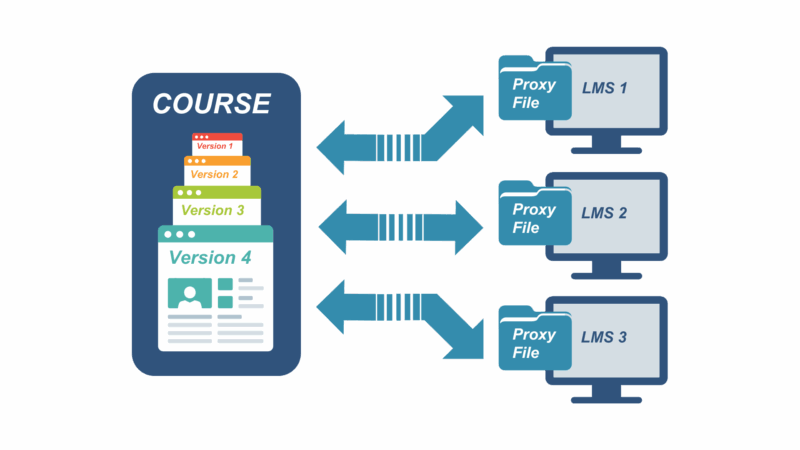
Our dispatch functionality can easily solve those problems and more. Dispatch allows you to share a “proxy” course package without any of the contents actually inside it. When it is imported into an LMS and a learner launches the course, it points the platform back to your original course file. With our course disptach features, you’ll be able to utilize all of these benefits and more.
- Update versions without reimporting
- Restrict content based on licenses
- Report on course progress from afar
A technical overview of dispatch
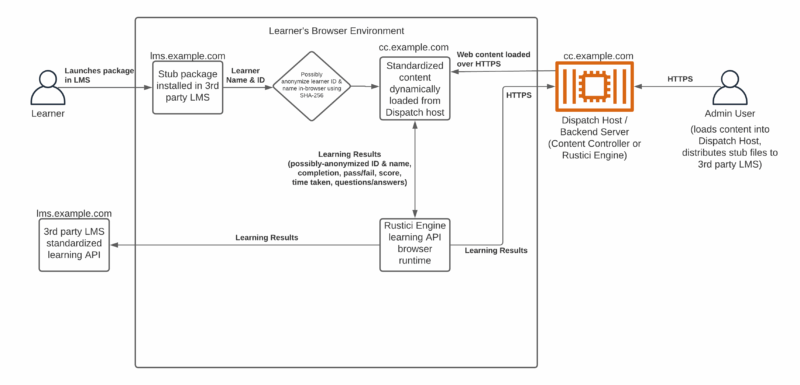
The simplified diagram below is applicable to Content Controller, the dispatch feature of SCORM Cloud, and Rustici Dispatch. In all three cases, we refer to the product as the “Dispatch Host” below.
This setup has two different types of users: administrators and learners.
Administrators log into the management interface (Content Controller or SCORM Cloud) or interact with the API (Rustici Dispatch or SCORM Cloud). They upload course content into the Dispatch host, and then download “stub” packages to be distributed to a third-party Learning Management System (LMS).
Learners launch the stub package through the LMS’s own packaging system. The third-party LMS provides the stub package with the learner’s ID and name, which the stub package may optionally anonymize in the browser using SHA-256 (depending on configuration). Then the stub package embeds the standardized content that was originally uploaded by the administrator to the Dispatch host. Note that this content is loaded directly from the Dispatch host over HTTPS, and the administrator may make subsequent edits to that content. Once the original content is loaded, the in-browser learning run-time sends learning data both to the third-party LMS and the Dispatch host.
Psst! You can “right-click” the image to open in a new tab and enlarge.
Where dispatch is in our applications
-
Content Controller
Our enterprise solution with its own user interface, Content Controller is a web application that helps you centrally host content and seamlessly deliver your courses or content to multiple LMSs at scale.
Grow with Content Controller -
SCORM Cloud
If you want something to get started at your own pace, SCORM Cloud can help you deliver and control your courses. The best part, you can get a free trial of SCORM Cloud today and get started with it’s dispatch functionality quickly.
Get started with SCORM Cloud -
Rustici Dispatch
The dispatch tool that started it all. Rustici Dispatch connects with your application via an API. If you already manage your courses with a custom application or if you’re adding training management to your proprietary platform, Rustici Dispatch is for you
Explore Rustici Dispatch

Have question on our dispatch functionality?
Reach out and ask us anything!